


Working workflows and useful outputs.
Connect agreed sources and tools to produce the notifications, records, drafts, reports or action lists your team needs.
AI AUTOMATION
From ad budget checks and quotation drafts to competitor monitoring, invoice matching and warehouse handoffs, ACS builds practical automation around the work your team already does.
Let the system handle repetition. Keep important decisions with people.
INPUT → CHECK → OUTPUT → HANDOFF
PRACTICAL AUTOMATION
These six use cases start with specific work, data sources and outputs. Build a small first version, then expand around your tools, usage and team practices.
All use cases and visuals are simulated examples, not real client data or verified results. Integrations, rules and deliverables are agreed per project.
Collect ad data on an agreed schedule, check budget usage, selected metrics and freshness, notify the owner of issues, and prepare a weekly summary with sources.
For
Brand marketing teams, agencies and teams managing multiple ad accounts.
What you receive
Daily attention list, budget alerts with sources and periods, weekly master table and reviewable summary. Creative / hook tags can be added from an approved mapping.
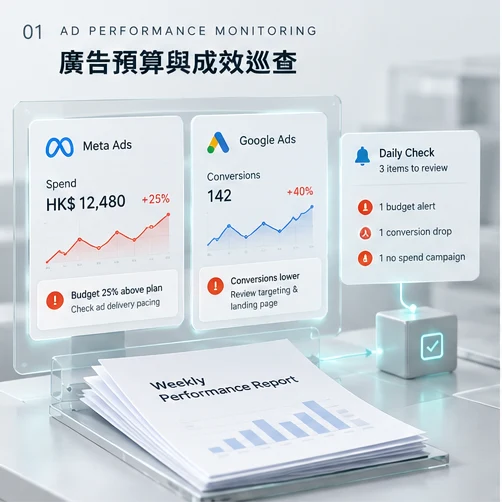
Authorised ad data + approved budget → period and freshness checks → pacing calculation → agreed rules → internal notification → weekly draft.
One Meta Ads account, one Google Ads account, one budget table, three alert rules, one internal channel and one weekly format. GA4, CRM outcomes and creative analysis are additional scope.
Client-agreed rules cover pacing, CPA over a specified window, campaigns with no spend and source-update failures. They are not universal platform standards. Account for attribution delays; do not judge performance from an unfinished day or sum platform-attributed conversions as deduplicated orders.
Rules calculate and check data; AI drafts from checked records; people confirm causes, budget changes and external conclusions.
Confirm account authorisation, available data and periods. Withhold combined conclusions for stale sources. Alerts do not change ads.
Collect enquiries from designated email, forms or authorised messaging channels. Extract quantity, budget, dates and missing details. Once complete, draft from approved prices and remind the owner to follow up.
For
B2B services, corporate gifts, wholesale and teams with human quote approval.
What you receive
Enquiry and opportunity table, owners and next steps, approved-price quote drafts, reply drafts for review, and unassigned or follow-up reminders.
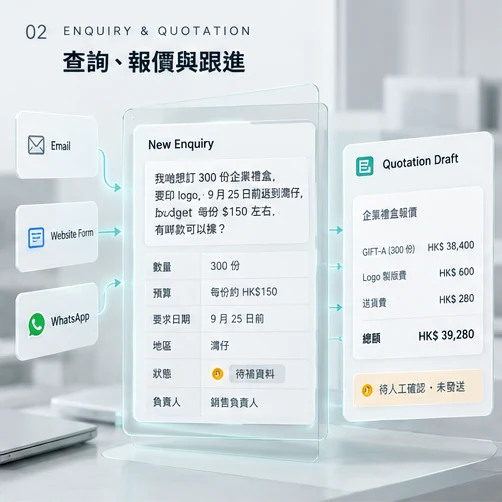
Enquiry → requirements and missing fields → update the same case → approved-price calculation → sales review → internal follow-up.
One entry point, opportunity table, price list, quote template, two reminder rules and one approval step.
Remind a supervisor if unassigned within agreed working hours. After a formal quote is sent, check for a reply or next step after client-defined working days. Stop or adjust for won, declined, replied or contact-later cases. Updates to one conversation stay in the same case.
AI structures requirements and reply drafts; rules calculate approved prices and track status; sales confirms the product, stock, print, delivery, terms and commitments.
WhatsApp and similar channels require suitable business connections, authorisation and messaging rules; private WhatsApp is not read arbitrarily. This page shows internal reminders and drafts only; it sends no quotes or follow-up messages.
Monitor specified product pages for price, pack size, offer conditions and page availability. Notify the owner of relevant changes with previous and current records, source and time.
For
Retail, ecommerce, brands and teams tracking market prices.
What you receive
Price history, price and offer-condition alerts, page availability alerts, read-failure records and a concise weekly change summary.

Confirm product pages → record specifications, price, conditions and time → like-for-like comparison → source-linked alert → weekly summary.
20 confirmed URLs on up to three sites, two checks a day, one history table and a set of price or status rules. A discussion starting point, not a fixed package or availability guarantee.
Record product identity, volume, pack count, retailer, currency, public price, membership or offer conditions, minimum quantity, page availability, time and source evidence. Separate differing packs and member offers; retain and mark stale data on failure.
Rules compare specifications and prices; AI summarises checked changes; people confirm sources, product mapping and commercial responses.
Assess access and site terms first. No guarantee every site can be read reliably and no bypassing login, payment or other restrictions. Page availability is not warehouse inventory; your own prices are not changed automatically.
Keep images, copy, landing pages, versions and launch information in one campaign record. Identify missing items and notify owners; prepare a clear launch handoff once agreed conditions are met.
For
Brand marketing teams, agencies and teams with multiple reviewers.
What you receive
Deliverable and version register, asset-specific revisions, formal approvals, deadline reminders and a handoff pack of approved assets, copy, links, schedule and ad details.
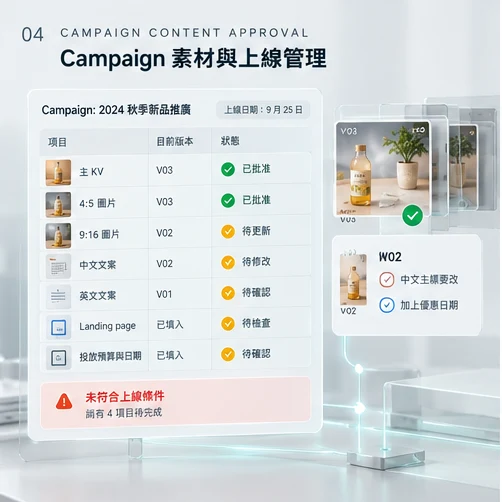
Deliverable list → assets and versions → version-linked feedback → formal approval → date and missing-item checks → launch handoff.
One campaign type, asset location, deliverable checklist, approval path, deadline reminder set and standard handoff pack.
“Change the headline” is not approval. Record the authorised approver, time and version. New versions do not inherit approval; a final filename is insufficient. Preserve retrievable versions or snapshots. Date conflicts belong to the copy item; ambiguous dates need human review.
Rules track versions, counts and dates; AI organises feedback and tasks; authorised people approve specific versions and scheduling.
Handoff is ready only after the date conflict and every pending item are resolved. This page does not upload, schedule or run ads.
Collect supplier documents from a designated inbox or folder, structure invoice numbers, dates and lines, and match purchase and receipt records. Flag duplicates, price differences or incomplete receipts for review, not payment.
For
SMEs and operations teams checking purchasing, receiving and supplier payments.
What you receive
Invoice register, original-file and source mapping, duplicate and difference lists, review and approval records, and accounting-system bill drafts if included.
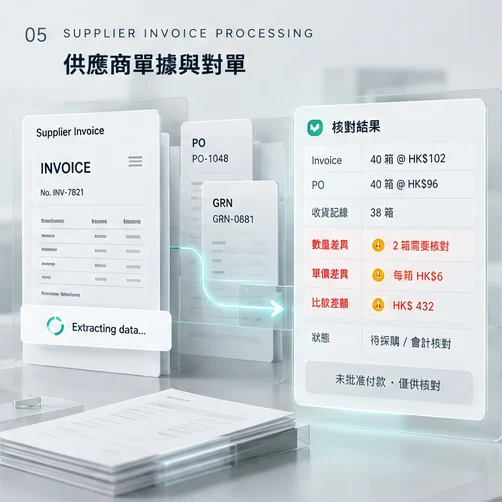
Receive → retain original and source → extract and check fields → duplicate checks → match orders and receipts → list differences → procurement / accounting review → bill draft if scoped.
One company, one invoice inbox, three to five main supplier formats, one matching table and one human review path. Accounting connections depend on tools and permissions.
Test languages, layouts, handwriting and unclear documents. Leave uncertain fields unverified. Do not create duplicate payable records for the same supplier and invoice identity; a difference is not confirmed overbilling.
AI extracts fields; rules match identity, quantity and amounts; procurement / accounting checks exceptions, tax, account coding and payment approval.
Check what existing tools already handle before rebuilding. No guarantee of perfect extraction, automatic payments or automatic acceptance of supplier bank-detail changes.
Bring branch orders into one entry point and organise by product code, box / unit conversion and cutoff. Check availability, prepare allocation suggestions and picking lists, and track shortages separately without retyping.
For
Wholesale, retail, multi-branch and central-warehouse ordering teams.
What you receive
Branch order and status records, cutoff demand totals, pending allocation and shortage lists, location-ordered picking lists, and dispatch / handoff records within scope.
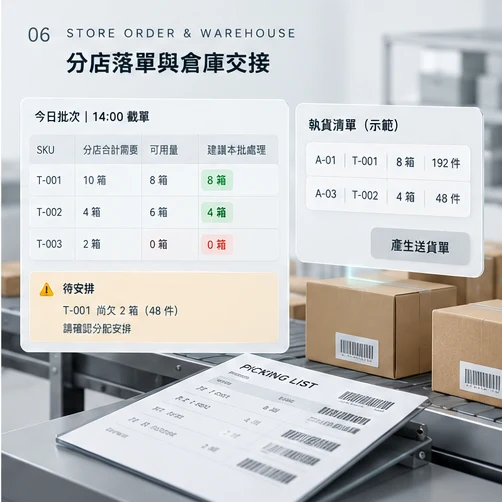
Authorised branch submission → deduplication and master checks → 14:00 cutoff totals → availability checks → supervisor allocation review → location-ordered picking suggestions → warehouse confirms actual dispatch.
One central warehouse, up to five branch roles, one product master, one cutoff process and one picking output. Full purchasing, accounting, returns, batch / expiry tracking and route planning are separate.
Branches access authorised records only; repeated submissions do not create new orders. SKUs must match the master: T-001 is 24 units per box at A-01; T-002 is 12 at A-03. Late orders enter the next batch or an approved exception. Agreed rules or a supervisor allocate shortages.
Rules handle master data, conversions, deduplication and batches. AI may summarise the handoff, not guess SKUs or priority branches. Supervisors approve allocation; warehouse staff confirm actual dispatched quantities.
Available quantities already account for reservations. A picking suggestion is not a reservation, dispatch or delivery; no individual delivery note before branch allocation is confirmed. This website example creates no warehouse or permissions backend.
START SMALL
You do not need to rebuild the whole company at once. Choose repeatable work with clear inputs and outputs, build a usable first version, then adjust based on real use.
Use sanitised examples to show where information comes from, who handles it and what needs to be delivered.
Agree the entry point, tools, rules, outputs and human handoffs without putting every feature into phase one.
Test missing data, duplicate inputs, connection failures, version changes and decisions that need a person, as well as the normal path.
Document operation and handover, observe actual use, then decide whether to add sources, rules or departments.
Make one workflow work well before expanding.
DELIVERY & SCOPE
Connect agreed sources and tools to produce the notifications, records, drafts, reports or action lists your team needs.
Know the current step, when work should stop and who takes over, with the necessary rules, tests and operating guidance.
List setup, tool usage, ongoing maintenance and new requirements separately so future costs are clear.
Acceptance checks cover correct outputs, missing-data and exception flags, duplicate handling, effective human checks, and whether the team can inspect and take over. Time or cost savings require measurement.
BEFORE WE BEGIN
Yes. Start with a sanitised input and the output you want. We map the steps together; you do not need a flowchart in advance.
Not necessarily. We check your tools, account plans, formats and permissions before deciding what to retain, connect or add. Integration methods are confirmed before building.
No. They are relatable use cases. Scope depends on sources, volume, rules, outputs and exceptions, and can begin with a small version.
We agree required data, tools and authorisation, then set appropriate access and retention arrangements. Test data can be sanitised first; live connections follow project requirements.
Results do not all pass through automatically. Workflows include appropriate checks, failure records, alerts, retries or human handoffs. Important commitments and actions require confirmation. Ongoing monitoring and support are scoped separately.
These are listed separately: one-off setup, third-party tools or usage, ongoing maintenance and new features. Undefined scope is not described as all-inclusive.
Delivery includes operating and handover material within the agreed scope. Tool accounts, administration rights, third-party services and future change arrangements are confirmed at the start.